


Canasta - Fun & Friends
4.485.00 Reviews
App Specs
- Version
- 2026.33.84
- Updated On
- License
- Free
- Downloads
- 100,000+
- Developer
- GameDuell
- Categories
- Card
- Platform
- Android
Screenshots

 Analysis by AppCompare
When I want a card game that rewards a little planning without demanding a long stretch of uninterrupted attention, Canasta is an appealing choice. Canasta - Fun & Friends brings the familiar partnership card game to a phone, where I can fit a hand into a quiet break or use it as a reason to gather friends online. Its focus is still the play itself: building useful combinations, watching what others discard, and deciding when to commit rather than hold back.
What I look for in a quick card session
Canasta works best when I treat each hand as a small exercise in judgment, not as a race. A move that looks useful now may reveal too much or leave a partner with fewer options, so the game has a slower, more thoughtful rhythm than a casual matching game. That makes it a good fit for a lunch break or a relaxed evening, provided I have enough time to follow a hand through instead of tapping away while distracted.
For someone learning the rules, the main question is whether the app can make the first few rounds feel approachable. Here, a tutorial helps explain the basics, and the option to practice against AI gives a newcomer room to learn without feeling responsible for a live partner’s result. I’d use those tools before joining a more competitive-feeling match: focus on recognizing when to keep cards, when to make a meld, and how discards can give useful clues about what opponents may be collecting.
Reading the table, not just your hand
The most useful habit I’ve found in Canasta is to pause before each discard. A card that seems expendable can be exactly what another player needs, and a few turns of watching the discard pile can make a later decision much clearer. This is especially helpful for returning players who remember the general idea but need time to regain confidence with the flow of a hand.
That attention to the table is also why Canasta suits people who enjoy a bit of social strategy. It is less suited to someone looking for a game that can be played on autopilot or abandoned at any moment. If I’m likely to be interrupted, I’d choose a short solo puzzle or another game designed around quick turns instead; a partnership card game is more satisfying when I can stay present and keep track of what has changed.
Who will enjoy the online format
GameDuell’s card game is a natural option for players who already know Canasta and want to play when their usual group is not in the same room. It can also work for family members who are comfortable with a phone but prefer a familiar card game over a complicated new hobby. A private table makes sense for a planned game night, while public online play is better when I simply want to find a game without arranging a time with friends.
Compared with a physical deck, the app handles the practical setup for you: there is no need to shuffle, deal, or check every card by hand. That convenience comes with a trade-off. Face-to-face play offers more natural conversation and lets everyone read the mood at the table, while online play makes distance less of a barrier. If the social ritual matters more than convenience, a real deck is still the better choice; if getting a game started is the obstacle, the digital format has the edge.
Worth Reading Before You Choose

Flipboard Shows What News Apps Must Do Beyond the Feed

Switching to Android Auto Means Rethinking Your Driving Routine

Google Calendar Makes a Crowded Week Easier to Manage

Ludo King Makes the Most of the Minutes Between Plans

Baby Panda World Brings Quick Play to Modern Phones, but Its Game Library Feels Busy

ESPN’s Live Game View Makes Following Close Games Easier
Playing Canasta on a phone
The game is free to download and is rated for Everyone, so it is easy to try without paying up front. The store shows an average rating of 4.5 from around 4.4 thousand ratings, and it has passed 100 thousand installs. Those figures suggest that it has found an audience, but they don’t tell me whether every match will suit my preferences; the feel of Canasta depends on how much I enjoy its pace and social format.
First Impressions
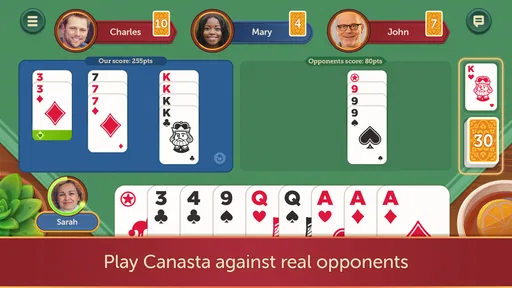
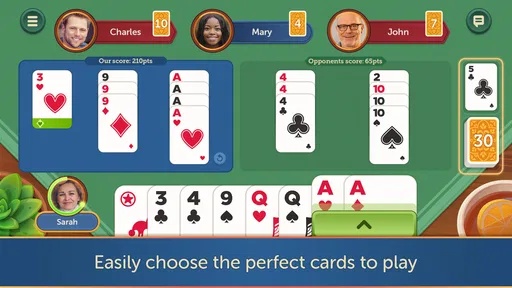
To kick things off, downloading Canasta - Fun & Friends was a breeze. It's available on both Android and iOS, so whether you’re team iPhone or Android, you’re covered. Once installed, the app welcomes you with a vibrant and user-friendly interface. The design is sleek and intuitive, making it super easy to navigate even if you're not a tech-savvy person.
Gameplay and Features
Now, let's dive into the nitty-gritty - the gameplay. Canasta is all about strategy and teamwork, and this app nails it. Whether you’re a seasoned player or a newbie, the app offers a perfect mix of challenge and fun. You can play against the AI if you're looking to practice, or jump into multiplayer mode and challenge your friends. The multiplayer feature is a game-changer, literally. It’s so much fun to connect with friends and family, especially when you can’t meet up in person.
One of the highlights for me was the customizable settings. You can tweak the rules to match your playing style, which is perfect if you have your own house rules. Plus, the app includes a detailed tutorial, which is a lifesaver for beginners. It walks you through the basic rules and strategies, so you’re not left in the dark.
Social Features
What sets Canasta - Fun & Friends apart from other card games is its social aspect. The chat feature lets you banter with your opponents, making the game feel more interactive. You can send emojis and quick messages, which adds a layer of fun to the experience. Plus, there’s an option to create a private table for just you and your friends, which is fantastic for a cozy game night.
A practical way to make that private-table option more useful is to agree on a start time and house rules before everyone joins. That avoids spending the first part of the gathering sorting out expectations and lets the group get into the game sooner. For relatives or friends who are still learning, I’d keep the first session relaxed and use the tutorial or practice play beforehand; that way, the shared table feels welcoming rather than like a test.
Graphics and Sound
I have to give a shoutout to the graphics and sound design. The visuals are crisp, colorful, and easy on the eyes, enhancing the overall gaming experience. The sound effects add to the ambiance, but they’re subtle enough not to be distracting. And if you’re like me and prefer a quieter game, you can easily mute the sounds in the settings.
Speed, stability, and longer sessions
For this kind of card game, perceived speed is less about flashy animation and more about whether the interface keeps the turn moving. The original play experience felt smooth to me, and clear card visuals matter because a pause to inspect a move can be a deliberate choice rather than a slowdown. In a longer session, though, concentration is the bigger demand: tracking discards and adapting to a partner’s choices takes more attention than simply waiting for the next turn.
I’d also separate a smooth session from a guarantee that every connection or device will behave identically. Online play depends on being able to stay connected, so if a match is interrupted, I would first check the connection and reopen the game before assuming the issue is a lasting fault. I would avoid starting a hand just before a commute or other situation where signal and attention may change. That small bit of planning is more useful than expecting a card game to make interruptions disappear.
Device fit and day-to-day use
The current version is 2026.7.125, and the Android minimum is 7.0. If you’re using Android, that gives you a straightforward compatibility check before installing; on either platform, I’d keep enough free space for ordinary app updates and close other demanding tasks if a phone is already struggling. A card game is not the sort of experience I’d choose to test an older or overloaded device with, but the simple turn-based format is naturally less demanding than a graphically intensive action game.
For everyday use, I’d think about where I play as much as what phone I use. A short session at home is a better setting for multiplayer than trying to coordinate a full hand while juggling messages or errands. If I only have a minute, I would wait rather than join and risk leaving other players mid-game. That is a small courtesy, but it also makes the match more enjoyable for me because I can actually follow the decisions.
Performance
In terms of performance, the app runs smoothly without any hiccups. I didn’t experience any lag or crashes, even when playing longer sessions. The developers clearly put a lot of effort into ensuring the app is stable and reliable, which is always appreciated.
Costs and the free-to-play trade-off
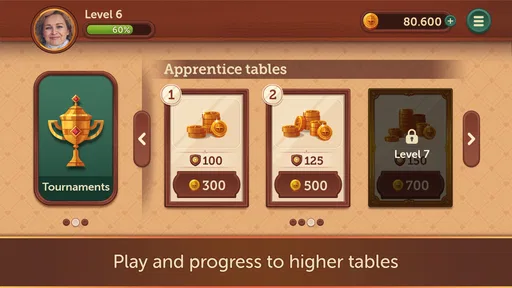
Like many apps, Canasta - Fun & Friends offers in-app purchases. You can buy coins and premium features, but the good news is that the game is completely enjoyable without spending a dime. The purchases are there to enhance the experience, not to make it playable, which is a huge plus in my book.
Purchases range from $0.99 to $219.99 per item, so I’d take a moment to look at the item and its cost before confirming anything, especially if a child is using the device. The useful question is not simply whether a purchase exists, but whether it improves the part of the game you personally value. If your aim is to play familiar Canasta with friends, I’d start free and decide later whether any paid extras are worth it for your own routine.
Where it fits among card games
Among digital card games, this one is a more focused choice than a broad collection of solitaire variations. Its appeal rests on learning the rhythm of Canasta and having other people to play with, rather than offering a different puzzle every time you open it. Compared with a general-purpose card app, that focus is a strength for Canasta fans and a limitation for someone who wants variety from one download.
I’d recommend it most to players who like partnership decisions, familiar rules, and the chance to bring a group together remotely. I’d steer away from it if you want a fast solo game, dislike online interaction, or prefer a fresh challenge each session without relying on other players. In those cases, a single-player card game or a broader card collection is likely to be a better match than trying to make Canasta serve a different purpose.
Final Thoughts
Overall, Canasta - Fun & Friends is a top-notch app for anyone looking to enjoy a classic card game with a modern twist. It’s engaging, social, and just plain fun. Whether you’re playing solo or with friends, this app delivers a fantastic card-playing experience. So, if you’re ready to challenge your friends to a game of Canasta, give this app a try. You won’t be disappointed!
Pros
- User-friendly interface for easy navigation.
- Smooth multiplayer experience with friends.
- Customizable game settings for variety.
- Engaging graphics and sound effects.
- Regular updates with new features.
Cons
- Occasional connectivity issues in multiplayer.
- In-app purchases can be pricey.
- Limited offline features available.
- Notifications can be overly frequent.
- Initial learning curve for beginners.
FAQs for Canasta - Fun & Friends
What is Canasta - Fun & Friends?
Canasta - Fun & Friends is a social card game app that brings the classic game of Canasta to your mobile device. It allows players to enjoy rounds of Canasta with friends or other players online, featuring a user-friendly interface and customizable game settings for a personalized experience.
Is Canasta - Fun & Friends available for both Android and iOS?
Yes, Canasta - Fun & Friends is available for download on both Android and iOS platforms. Players can easily find the app on the Google Play Store and the Apple App Store, ensuring accessibility to a wide range of users across different devices.
Are there in-app purchases in Canasta - Fun & Friends?
Yes, Canasta - Fun & Friends offers in-app purchases. While the app is free to download, players can purchase additional features or remove ads to enhance their gaming experience. These optional purchases provide benefits like extra game modes or customization options.
Can I play Canasta - Fun & Friends offline?
Canasta - Fun & Friends primarily focuses on online multiplayer games, allowing you to connect with friends or other players. However, there is also an offline mode where you can play against AI opponents, making it convenient to play even without an internet connection.
How do I invite friends to play Canasta - Fun & Friends?
Inviting friends to play is simple. Once you have created an account or logged in, you can connect your social media accounts or use your contact list to invite friends. The app provides easy-to-follow instructions to set up a game and send invitations directly from the app.


